Do you want to know how to build a better virtual classroom? It can be difficult to engage with students on virtual calls when we are accustomed to in person learning. Teachers are still adjusting to online features, while students are not engaged in the classroom. There is hope as here are a few ways that teachers can create a strong digital environment.
Constantly engage with your students during virtual classes. Set office hours for students who are struggling to learn the material. This way, students can visit the teacher at these times and know that the teacher is there to support them.
Have students read texts aloud to encourage them to participate and pay attention. Teachers can build off of this and have students write their own summaries and present it to other students in the class.
Give them responsibility! In elementary schools, teachers would usually have jobs for the students. Teachers can do the same thing with virtual learning by having students do different tasks. For example, have a student in charge of vocabulary, or have a student who finds inspirational quotes to say every time they meet for that week. For middle and high school students, teachers could incorporate a live journal for the students to have their thoughts about the material for everyone to read to let them have a voice.
The virtual classes provide amazing opportunities to use online resources to help the students study. Teachers can use Kahoot or Quizlet Live to engage with students and use these opportunities along with an incentive to encourage students to participate. Students can have blog posts assigned to them to have the teacher learn about the students.
Teachers should have students give their input on ways that they can stay in touch with one another. Teachers can create a student page by using Microsoft forms or Google forms to get student feedback on recognition for fellow classmates. Students would be able to feel proud about their accomplishments as it would be awarded for their time and effort. Make it a part of the class announcements with the information on class materials and extracurricular activities
Teachers are not the only ones who are stressed! Teachers can have meditations, or built in periods of peace in their class time, to allow students time to relax. This would let students reduce their stress and know that their teachers are in the same boat, too. Incorporate a set time for counseling for students to check in on them and see how they are feeling. Students would respond to this with their feelings, especially the subject material. After time, you will make them feel a little at ease.
College is the first step into adulthood many young people take in their lives, and it’s full of new experiences and decisions. “Where do I live?”, “What do I do?” and “How do I learn about my career?” are just a couple of the choices that occupy the average university apprentice’s mind daily. To lighten that mental load, here are four friendly websites that can offer a helping hand in the academic field of majors and midnight studies.
At first glance, PhET’s simulations tab at the University of Colorado Boulder may give off a more juvenile appearance, but don’t be fooled. These visual demonstrations are perfect explanations for those struggling with learning their fundamentals in the STEM field or for those considering a change in their career. While many college juniors and seniors may find this knowledge an excellent refresher, PhET simulations help ensure you have the basics of Kepler’s laws or molecule polarity if you’re just starting your major.
Textbooks are expensive. There’s no getting around it: dumping a hundred dollars (if you’re lucky) on a book that’ll get you through to the next semester isn’t a fun experience. That’s where OpenStax comes in. OpenStax provides an online education repertoire on various subjects, such as business, mathematics, social sciences, and even nursing, so money isn’t a limit in searching for knowledge.
First free textbooks, and now, there are free calculators? What’s this world coming to? The Desmos graphing calculator is a surprising powerhouse, considering the lack of a price tag. With multiple fields of entry for comparing different equations, the ability to save and load previous graphs, and even a compatibility option for Braille in the settings, one has to wonder why a TI-84 costs around $95 on Amazon. Best of all, an account isn’t even needed to use this “device.” Going to the website on your phone can provide you with an on-the-spot graphing calculator anytime! Convenient.
A foundational rule of logic is that things of great benefit often come with or can be used to great detriment. Such is the case with fire, the wheel, the plane, and, of course, recently, with AI.
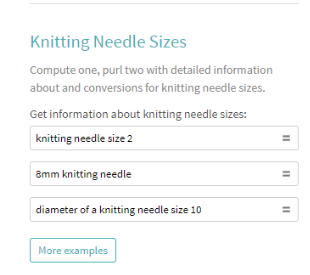
Wolfram Alpha is akin to ChatGPT but is considerably tuned into the world of education. If you want to compute the properties of a polyhedron, it’s got you. Having issues understanding what a moiré pattern is? It has the answer. As if being a goliath of the STEM field wasn’t enough, it can even assist with hypotheticals, such as how many baseballs can fit into a Boeing 747 or the number of watermelons it would require to touch the sun from Earth. Or perhaps you want to find the top ten most famous people named Spencer. Of course, Wolfram Alpha can provide.
This is a fantastic resource for checking one’s work or seeking a greater understanding of a tenuous concept that wasn’t explained adequately in the classroom. This shouldn’t be a substitute for the act of learning itself. So think twice before using this to scrape through algebra because if you use this to cheat through your work, you’ll only hurt yourself and your potential in the process.
Photo Courtesy of Wolfram Alpha
Oh, and it can answer questions about knitting needles, too. Isn’t that cool?
By Noah Moster
As stated beforehand, college is full of new experiences and decisions, which can feel paralyzing. However, it’s also the opening of the world, an understanding that you can do anything and be anyone, so long as you learn and grow in the field you feel passionate about. These are four tools to help with that goal, and hopefully, if used correctly, they can further your knowledge in the STEM sphere (or any educational sphere, for that matter)!
Do you want more resources on the topic of science college/university websites? NSTEM’s vast resources database provides thousands of searchable STEM resources by category, school level, and state. This comprehensive library includes info on enrichment activities, curricula, internships, scholarships, and more.Check out a free sampling here. Or get an NSTEM membership today to unlock the complete list.
When a college/university student achieves membership in the National STEM Honor Society, the recognition, like many colleges, is in a Greek letter format. For the National STEM Honor Society, Epsilon Theta Mu is the designated recognition for members at the college/university level. Students are distinguished and stand out as a result of this recognition, increasing appealing employment and educational opportunities, click here.
Zoom is a wonderful application that allows you to converse with people all around the world. During the pandemic, Zoom has brought people together in more ways than one. If you are a teacher, there is a method of breaking the virtual Zoom classroom into smaller groups for more intimate discussions.
Breakout rooms in Zoom allow the teacher to break the classroom into smaller groups, as they do in real life in the real classroom. For example, if the class has 24 students, the teacher could break the class into 4 groups of 6 students, or 6 groups of 4 students, whichever is better.
Before you work with Breakout rooms, it is important to understand a few things about them.
Before you break the students into groups, create a clear task that they have to complete when in the breakout rooms, such as brainstorming or answering a certain set of questions.
You also want to be mindful of the amount of time you give the students to brainstorm or answer the set of questions. Knowing how many students are in each breakout room is incredibly important when coming up with the amount of time it will take to complete the tasks.
If the group needs to take notes, there are different ways that the students can take notes, whether on a Google doc or handwritten notes. As the teacher, you should tell the students or teach them how to take notes and define a role as note taker to at least one person in each breakout room.
You should try to keep the groups the same or similar each time so the students begin to feel a connection with each other and learn to collaborate as a team. If the breakout rooms change all the time, it can be confusing to the students. Remind your students to encourage each other and help support each other throughout the process.
As the host of the Zoom meeting, you can monitor all the breakout rooms and go in and out of them as you please. Make sure that you become familiar with this process so that you can make sure that each breakout room is working as effectively and efficiently as possible. If you have a Teacher’s Assistant (TA), make sure that they can also weave in and out of the groups to facilitate the discussion.
There is an important option in the breakout room that says “Ask for help.” This button notifies the host that the student or students have a question and require help. Make sure that your students know about this option before separating into breakout rooms.
One amazing option that Zoom has is the option to share screens, in which, with the click of a button, all of the students in the breakout room can see the screen of the student who wants to share their screen. This can be very useful when taking notes, as all of the students can be on the same page, and each student in the breakout room can see the notes that are being typed.
Another important option in Zoom is the ability to set up specific groups ahead of time. If you know that two students really do not get along, you can make sure that they are not assigned to the same group. In the same vein, if two students get along really well, maybe you can assign them to the same group.
These past couple school years have thrown many curve balls. From virtual learning to social distancing regulations and unexpected school closures, teachers’ plates are abundantly full. This article aims to lift some of the weight off of educators’ shoulders by providing four lesson plans for middle school math classes. All can be adapted to an online format and will engage your students and accelerate their learning!
Basic and Straightforward Lesson Plan With High Student Involvement
Begin with a “Do Now”—a low-stakes question to warm up students’ brains and reinforce a recently-learned skill. This website has many great ideas for short, grade-specific problems and worksheets. Depending on your class, it may be wise to have students hand these in for grading to motivate them to do some light studying prior to each class. Perhaps invite a student to come up to the board and present their approach to the class. If virtual, have a student upload a picture of their work or let them use the drawing feature many video conferencing applications have in order to show their thinking.
Following the theme of student presentations, randomly select students to present their answers to the homework. Encouraging students to walk through and explain their process forces them to think critically about their approach and the topics involved. Allow students to pose questions or offer other methods. Step in when necessary, but be sure to give students the space to toy with their ideas too.
Synthesize the key topics and methods that appeared in the homework. Enlist the students’ help to create a running list of the material covered in the unit. Students can copy these lists to use as a studying “checklist” prior to assessments. Ask which ideas are proving to be more difficult to grasp and perhaps assign supplemental work that hones in on these skills.
Now that the students have done most of the leading for this class period, it’s time for you, the teacher, to step in and speak directly to the class. If there is new material to cover or explain, spend a few minutes outlining it and answering questions. This point in the class is a great time to give a short preview to students about what their classwork and homework will cover.
Split students into groups or “breakout rooms” and give them a worksheet or problem set to work on collectively. Bounce between each group to check on their progress and assess which groups are moving more slowly. If students do not complete their work, consider whether you want it to be added to the homework or to be finished next class period.
Begin by splitting students up into two teams. Line them up single-file facing the board. If remote, do not use breakout rooms. Have each group select their first contestant. Read or project a math problem or question that should not take more than 45 seconds to solve. Make sure everyone is on mute if you are remote. The first student to correctly complete the problem earns a point for their team. Continue this mini “contest” for as long as you’d like or until a team reaches a certain number of points. Be sure every student has a chance to participate.
A spin-off of this game is to use the same two-team structure and fill a hat with a variety of math concepts from their recent units. If you are teaching virtually, consider entering the topics into a random generator beforehand, or randomly assign them to students. Have a student from one team pick from the hat and briefly explain the concept. If they are correct, their team gains a point. Then repeat the same for the opposing team. Consider adding a “phone a friend” option to engage more students and to give each team a chance to earn partial points even if the initial student did not correctly explain the concept.
If you have a larger class, it may be better to play a game like “Jeopardy”, which allows for multiple teams. Begin by splitting the class into as many teams as needed (ideally with around three students per team). Have students choose their topic and point value and give them a set amount of time to produce an answer as a group. Allow other teams to “steal” for optimal student involvement. If virtual, use breakout rooms and submit the question to the chat so that teams can work independently of one another. This game requires a larger amount of preparation beforehand, but is a huge pay-off when you see how much your students enjoy it.
Debrief with your students at the end of the games to highlight the topics that routinely came up. Also emphasize the ones that prove to be tricky for much of the class. Consider rewarding winning teams with extra points on the next quiz or test!
Pre-Assessment Class to Prepare Students
Ask students to prepare a quiz before this class period. The quizzes should cover material that is fair-game for the upcoming assessment and should only take 10-15 minutes. Make sure they create an answer key too. Randomly pair them up and ask them to exchange quizzes with their partner. If remote, students can “share” their document with each other. Have students grade the quizzes they took using their classmate’s answer key. This activity accomplishes two goals: forcing students to deeply consider what will be on the assessment, and gain valuable practice which will calm their nerves and help them to identify the areas where they need additional practice.
Expand on the running topic list you may have created from other classes. Perhaps list relevant problems associated with each key idea and create bullet points that succinctly describe the concept. If there are problem types that routinely show up, give an example of how to complete it (for example, completing the square). By the end of this exercise, you will have formed a mini study guide that students can copy and reference when studying.
To engage students further, assign students to make a “pamphlet” detailing the test material. They can divide a paper into thirds and list the topics along with their relevance, problem examples, and connections to other topics. Encourage them to add color and diagrams in order to increase the fun and make the project more accessible for visual learners.
Hands-On Activities
Although these activities may be better in a classroom setting, they can all be adapted for virtual learning. If students are learning about the concept of slope, assign them to find the slope of stairs in your school or in their home. Ask them to consider what a good slope would be for a set of stairs and what a poor slope would be.
For a yummy assignment, give students a basic recipe but replace all the measurements with math expressions. For example: add ½ x ¾ cups of brown sugar. This project will not only be a huge hit, but students can practice using fractions and see their practical use.
If students are learning about pie charts and percentages, have the students create a pie chart detailing the activities of their day. For example: 33.3% sleeping, 20% playing, etc. Make sure they add a key and color code the pie sectors.
If students are learning about lines and graphs in general, ask them to graph a scenario. Perhaps they choose to create a line graph that plots a car’s distance vs. time or the level of bathtub water as someone fills up the tub, gets in, and drains it. The possibilities are truly endless so encourage the class to get creative. Give them space to share their products with their classmates.
If you had told someone from just 40 years ago that we’d be crafting entire worlds to interact with using just the typical VR set or even just a smartphone and a cardboard case, you’d probably be tested for drug use. However, VR has taken the world by storm, and it’s undoubtedly here to stay by the looks of it. So why not utilize it for education and learn how it works?
Today, we’ll explore virtual reality through three distinct dimensions: the example program as an outside observer, the learning program for starting in the VR field, and finally, powerful software to develop a personal (or professional) career in virtual reality! Strap your goggles in, make sure your surroundings are clear of obstacles, and prepare yourself for a swim in the sea of technology!
Let’s start with a simple question: What is virtual reality? Virtual reality is a simulation of any environment using immersive technology to transport the viewer into the target space mentally. When thinking about VR, one’s mind often focuses on fantastical areas, such as a cyborg pirate ship or perhaps a creaky abandoned amusement park with killer clowns. However, virtual reality can just as easily personify places that may exist but that the viewer will likely never see, such as Mars or the Himalayan Mountains.
The Google Arts and & Culture department has found an engaging way to encapsulate this approach with their virtual field trips explicitly designed for the classroom. This website showcases firsthand the possibilities available in the VR sphere to those who drive themselves to produce and present their craft to the world, and it serves as an example of just the beginning of the advancements this field will hold for those working within.
But you’ve already clicked on this blog post, and you likely don’t need to be espoused about the benefits of gaining more in-depth knowledge of the technological tools of creation. What you likely want to know is: how? How can students start honing their skills with regard to virtual reality?
Look no further than the VR Development course for Unity Learn. Unity is a very popular engine for video game creation. In the mutual interest of growing more creators in their community, they have constructed a mission-centric training module to help those trying to learn and break the mold of VR experiences. This website will help you understand the basics of virtual reality and its terminology. As a bonus, it even has a link at the bottom for potential job opportunities in the field, which you should check out regardless of whether or not this is just a passion or a profession.
Something to be said is that this module will (obviously) utilize the Unity program, so if you aren’t familiar with it, you might want to take a look at this website, which has a similar learning course for the Unity Editor (link to website: https://learn.unity.com/pathway/unity-essentials).
Okay, you’ve seen where VR can take you and started figuring out the basics. Now, you decide on the next step in creating a virtual sphere: interactivity or realism. Unity is excellent software for making interactive experiences, and if you’re the type of person who inundates yourself deep into one program rather than having a comparatively shallow knowledge of many applications, you’ll likely want to stick with it for the long haul and learn everything you can.
Blender is a strong competitor if you are more interested in crafting a more narrative-driven environment or desire more authenticity in, say, the walking animations of a character or the facial reactions. The common consensus is that Blender can handle the complexity that Unity may struggle with sometimes. That’s probably because Blender focuses on the 3D animation aspect, which is less suited for making games such as films or scenes. However, both have roughly equal value in the market, so it’s up to you what knowledge you’ll want to cultivate.
Virtual reality is ever-expanding. This article may not even be accurate in two or three years, but that’s how fast the industry is changing. Fortunately, with those whirlwinds of progression come opportunity, and opportunity is the perfect ally to the prospective amateur. Just remember that, above all else, what matters is that you’re learning and growing. With one learned failure comes a thousand potential successes. And as long as you’re enjoying your journey, it doesn’t matter what you make, only that you’re proud of what you’ve accomplished! So get working! Your future’s waiting for you.
By Noah Moster
Do you want more resources on the topic ofVirtual Reality? NSTEM’s vast resources database provides thousands of STEM resources that are searchable by category, school level, and state. This comprehensive library includes information on enrichment activities, curricula, internships, scholarships, and more. Check out a free sampling here, or get anNSTEM membership today to unlock the complete list.
Project-based learning enrichment provides high school students with college and career readiness. It gives them real-world relevance, transforming students into collaborators and imaginative problem solvers. They will gain the upper hand in a global landscape, stemming from enhanced confidence and grit. NSTEM provides these young STEM enthusiasts with a close community of like-minded fellow students and educators. To start your 9-12 Chapter of the National STEM Honor Society,click here.
At first glance, the STEM field can be daunting for those just starting to learn in the world around us. Science, Technology, Engineering, and Math aren’t initially concepts that one would introduce in the same vein as learning the alphabet. But that’s the beautiful thing about learning: there is no failure, only success, and experience gained. Additionally, with the advent of mobile devices, lessons don’t have to be taught solely in the classroom. Students are free to grow wherever they’d like to. With that in mind, here are three education-based apps suited for K-2 students that require only a smartphone and an eager brain!
1. PBS Kids Games
The Public Broadcasting Station is always a phenomenal educational resource for students of all ages and types, so they’re never the wrong choice regarding mobile learning for younger audiences. PBS Kids Games creates many games covering various topics: Alaskan Native culture, nature, space…they’ve got it all! There’s even an app specifically for STEM-based learning:The Cat In The Hat Invents. When it comes to quantity alone, no other option bests PBS.
2. ScratchJr
What’s more fun? Getting a fully built Lego set or assembling the construction yourself? The answer is often, of course, the latter. In that same respect, ScratchJr doesn’t provide a story or game to follow. It lays out the tools in the form of “graphical programming blocks” (in other words, characters, objects, and places controlled by computer language in the visual style of puzzle pieces) so that students can tell their own narratives instead! “Imagination” isn’t the first thing that comes to mind when considering the STEM field. Still, ScratchJr blows that stereotype out of the water by merging creativity and formulaic learning to round out the ideal schooling service.
3. Duck Duck Moose
Duck Duck Moose, similar to PBS Kids Games, is a collection of games rather than one app in particular. While it doesn’t have the immense variety of topics that PBS hosts, the advantage of Duck Duck Moose is that it has a tighter target audience, ages 2-10. Whereas other app companies may employ a wide net, this one caters to the focus group by covering grounded topics such as math, reading, and storytelling. If all else fails, it falls to the classic point of interest for kids: trucks and princesses (not in one app, unfortunately). It’s simple and sweet.
In a world where the smartphone stays with us any day for longer than our wallet, shoes, or even the clothes we wear, it often remains surprisingly unutilized in many cases when it comes to helping children increase their awareness of the vast biome they reside in! The phrase “kids and their dang phones” gets thrown around semi-frequently, and there is undeniable merit in seeing the world through one’s eyes. But if this technology is going to saturate the world as we know it (which it has already accomplished), the best option is to wield these computers to the advantage of the rising generation. There’s an empire of knowledge at their fingertips, and these three apps are merely the stepping stones for a wealth of success and experience gain.
By Noah Moster
Do you want more resources on the topic of educational STEM apps? NSTEM’s vast resources database provides thousands of searchable STEM resources by category, school level, and state. This comprehensive library includes info on enrichment activities, curricula, internships, scholarships, and more. Check out a free sampling here. Or get anNSTEM membership today to unlock the complete list.
Project-based learning enrichment provides high school students with college and career readiness. It gives them real-world relevance, transforming students into collaborators and imaginative problem solvers. They will gain the upper hand in a global landscape, stemming from enhanced confidence and grit. NSTEM provides these young STEM enthusiasts with a close community of like-minded fellow students and educators. To start your K-2 Chapter of the National STEM Honor Society,click here.